![[BeautifulSoup] Web Scraping](https://img1.daumcdn.net/thumb/R750x0/?scode=mtistory2&fname=https%3A%2F%2Fblog.kakaocdn.net%2Fdna%2FKgYnX%2FbtrGiuOauZX%2FAAAAAAAAAAAAAAAAAAAAALvpYDi89JJG25jIa7Mep9aQPAsBrb3bvIMqMY87Uf_l%2Fimg.png%3Fcredential%3DyqXZFxpELC7KVnFOS48ylbz2pIh7yKj8%26expires%3D1780239599%26allow_ip%3D%26allow_referer%3D%26signature%3DB3%252FvNftA2Q5wN8UsyZuUIcIaJxQ%253D)
1. What is Web Scraping
Web scraping, web harvesting, or web extraction is data scraping used for extracting data from websites. The web scraping software may directly access the World Wide Web using the Hyper Transfer Protocol or a web browser. While web scraping can be done manually by a software user, the term typically refers to automated processes implemented using a bot or web scraper.
Some websites allow web scraping and some don't. To know whether a website allows web scraping or not, you can look at the website's "robots.txt" file.
2. How to scrape data from a web site
To extract data using web scraping with python, you need to follow basic steps :
1. Find the URL that you want to scrape
2. Inspecting the Page
3. Find the data you want to extract
4. Write the code
5. Run the code and extract the data
6. Store the data in the required format
Python has various applications and there are different libraries for different purposes.
- Selenium : Seleinum is a web testing library. It is ued to automate browser activies
- BeautifulSoup : Beautiful Soup is a Python package for parsing HTML and XML documents. It creates parse trees that is helpful to extract data easily
- Pandas : Pandas is a library used for data manipulation and analysis. It ius used to extract the data and store it in the desired format.
3. Web Scraping
Step 1 : Find the URL that you want to scrape
I am going scrape PassMark Software website to extract the Name, and Average G3D Marks of Gpu card. The URL for this page is https://www.videocardbenchmark.net/high_end_gpus.html .
PassMark Video Card (GPU) Benchmarks - High End Video Cards
Video Card Benchmarks - Over 1,000,000 Video Cards and 3,900 Models Benchmarked and compared in graph form - This page contains a graph which includes benchmark results for high end Video Cards - such as recently released ATI and nVidia video cards using t
www.videocardbenchmark.net
Step 2 : Inspecting the Page
The data is usually nested in tags. So, we inspect the page to see, under which tage the data we want to scrape is neted. To inspect the page, just right click on the element and click on "Inspect".
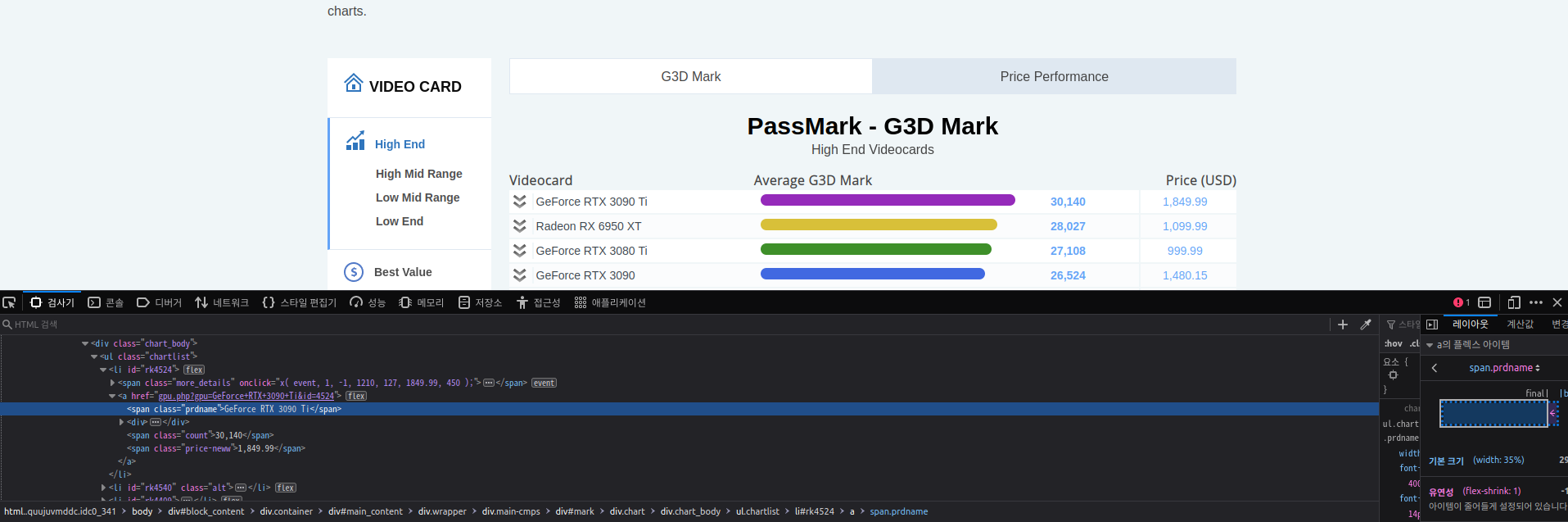
Step 3 : Find the data you want to extract
What we want to scrape is in <div class='chart_body'>.
Step 4 : Write the code
First, let us import all the necessary libraries.
from selenium import webdriver
from bs4 import BeautifulSoup
import pandas as pd
To configure webdriver to use FireFox browser, we have to set the path to geckodriver.
driver = webdriver.Firefox(executable_path = '/usr/bin/geckodriver')Refer the below code to opeb the URL :
products = []
g3d_marks = []
driver.get("https://www.videocardbenchmark.net/high_end_gpus.html")
When we use driver.get('url'), driver get all of the html tags from web pages.
Now that we have written the code to open the URL, it's time to extract data from the website. The data to extract is nested in <div> tags. So, I will find the div tags with those respective class-names, extract the data and store the data in a variable.
products = []
g3d_marks = []
driver.get("https://www.videocardbenchmark.net/high_end_gpus.html")
content = driver.page_source
soup = BeautifulSoup(content)

# findAll method return all tags in html pages

for prdname in soup.findAll('span', 'prdname') :
    product = prdname.text
    products.append(product)

for count in soup.findAll('span', 'count') :
    counts = count.text
    g3d_marks.append(counts)

df = pd.DataFrame({'Gpu' : products, 'G3D_Marks' : g3d_marks})
df.head()
Sources from :
https://www.edureka.co/blog/web-scraping-with-python/
Web Scraping With Python - Full Guide to Python Web Scraping
In this web scraping with Python tutorial, you will learn about web scraping and how data can be extracted, manipulated and stored in a file using Python.
www.edureka.co
'Programming > Python' 카테고리의 다른 글
| [DS] Heap (0) | 2022.09.03 |
|---|---|
| [DS] Queue (0) | 2022.09.03 |
| [Error] Error and Exception (0) | 2022.08.16 |
| [BeautifulTable] Print list object in table format (0) | 2022.07.04 |
| [Pandas] Return multiple columns (0) | 2022.07.03 |